Data resource management is an activity that applies information systems technologies to the task of managing an organization’s data resources to meet the information needs of its stakeholders.
What is Data?
Data are pieces of information or fact related to the object being considered – not limited to facts themselves, since pictures, images and files are also data. Each data item is associated with an attribute called a data type that tells a computer system how to interpret its value:
| Data type | Description | Example |
|---|---|---|
| Integer | Numbers without a fractional component | -245; 0; 520 |
| Floating point | Numbers that may have a fractional component | -32.345; 234.002 |
| Character | A single letter, digit, punctuation mark, symbol or blank space | ‘A’; ‘7’; ‘?’ |
| String | A sequence of characters or text | “Hello John” |
| Boolean | Data with only two possible values | True/false; 1 or 0 |
| Date | Generally in the YYYY-MM-DD format | 2021-10-03 |
| Time / Date time | In hh:mm:ss format, or date and time together | 09:30:20 |
What is a Database?
A database is a collection of logically related information organized so it can be easily accessed, managed and updated, usually controlled by a database management system (DBMS). Types of database in an organization: Operational (supports daily business operations), Distributed (replicated across network servers at various sites), External (owned by other organizations, accessed over the internet), and Internal (operational databases and data warehouses).
Components of a Database
Hardware (physical devices), Software (DBMS, OS, network software), Data (raw facts to be organized), Procedures (instructions for setup, login/logout, etc.), and Database Access Language (used to write commands to access, update and delete data).
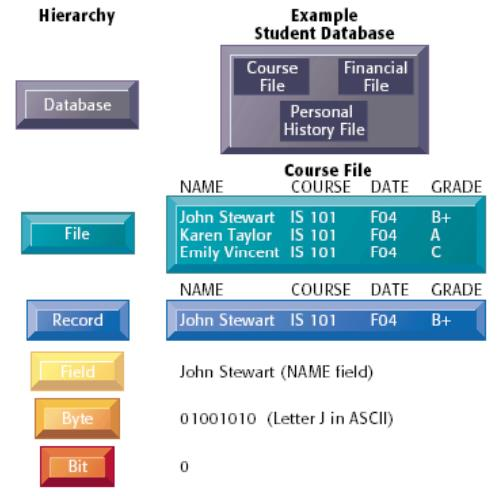
Data Organization: The Data Hierarchy
- Bit: smallest unit of data; a binary digit (0 or 1).
- Byte: a group of 8 bits that represents a single character.
- Character: a single alphabetic, numeric or other symbol.
- Field: a group of related characters and numbers.
- Record: a collection of related fields.
- Table: a collection of related records with a unique table name.
- File: a group of related records.
- Database: an integrated collection of logically related data elements.
Problems of Traditional File Processing
- Data Redundancy: duplicate data requires updates to be made in every file that stores it.
- Lack of Data Integration: data stored in separate files requires special programs for output, making ad hoc reporting difficult.
- Data Dependence: programs must include information about how data is stored, so a change in storage format requires a change in programs.
Note: Data mining is the process of analyzing massive volumes of data from different angles to identify relationships and transform them into actionable information.