HTML Overview
HTML stands for HyperText Markup Language, the most widely used language for writing web pages, created by Tim Berners-Lee in late 1991. As a markup language, HTML is used to “mark up” a text document with tags that tell a web browser how to structure and display it. To create a web page you need a text editor (Notepad, Notepad++, Brackets, Adobe Dreamweaver, etc.); save the code with a .html or .htm extension and open it in a browser to view it.
Basic HTML Document
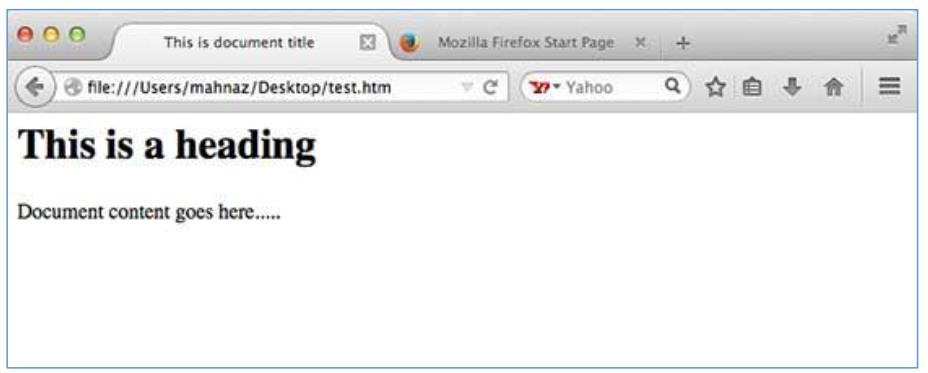
<!DOCTYPE html>
<html>
  <head>
    <title>This is document title</title>
  </head>
  <body>
    <h1>This is a heading</h1>
    <p>Document content goes here.....</p>
  </body>
</html>
HTML Tags
A tag is a set of characters constituting a formatted command for a web page, enclosed within angle braces, e.g. <html>. Most tags have a corresponding closing tag, e.g. <html> closes with </html>; a few, like <hr />, are “empty elements” needing no closing tag.
| Tag | Description |
|---|---|
| <!DOCTYPE…> | Defines the document type and HTML version. |
| <html> | Encloses the complete document: the header (<head>) and body (<body>). |
| <head> | The document’s header, holding tags like <title>, <link>. |
| <title> | Used inside <head> to set the document title. |
| <body> | The document’s body, holding tags like <h1>, <div>, <p>. |
General HTML Document Structure
A typical HTML document is structured as a document declaration tag, followed by <html> containing <head>...</head> and <body>...</body>. The current HTML version is 5, declared with <!DOCTYPE html>.
HTML Elements
An HTML element is defined by a starting tag and, if it contains content, a matching closing tag preceded by a forward slash, e.g. <p>...</p>. Elements needing no closing tag, such as <img />, <hr /> and <br />, are called void elements. HTML documents consist of a tree of these elements, and elements can be nested inside one another.
HTML Tag vs. Element
A tag is the individual opening or closing marker (e.g. <p> or </p>); an element is the tag together with its content (e.g. <p>This is a paragraph</p>).